Ricing Hyprland with Claude Code CLI

Table of contents
I Never Had Time for This
You know those r/unixporn posts with the gorgeous Hyprland setups? I’ve been jealous of those for years. But every time I tried to get into ricing, I’d hit a wall. Config files everywhere, weird syntax, tools I’ve never heard of. And honestly? I have a job and a family. I don’t have weekends to burn figuring out why my window borders won’t change color.
So I just used Gnome. It works, it’s fine, whatever. I spent my free time on other projects.
Then I started using Claude Code CLI for work stuff and thought - wait, can this thing do Hyprland configs?
Turns out, yes. And it’s kind of great.
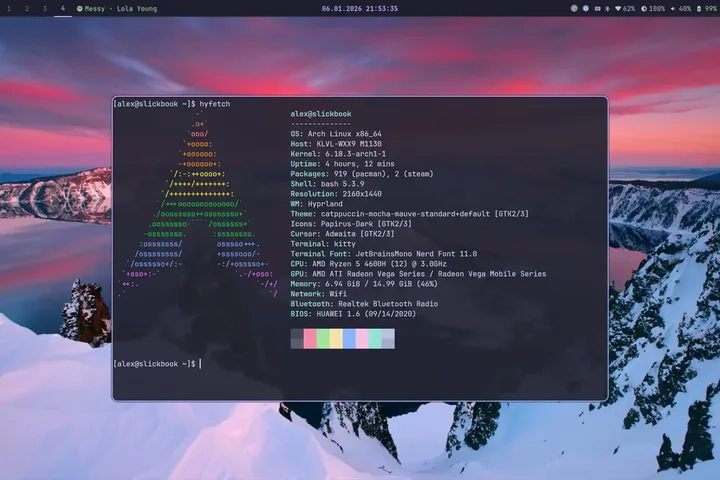
How This Actually Works
I just… tell it what I want. “Make Super+Enter open my terminal.” “I want gaps between windows, like 10 pixels or something.” “Make Spotify always open on workspace 4.”
Claude writes the config. I reload Hyprland. It works. Or it doesn’t, and I tell Claude what went wrong, and it fixes it.
That’s basically it. No wiki rabbit holes. No copying configs from GitHub and hoping they work with my setup.
The whole thing I set up - keybindings, window rules, how things look, my Waybar - all of it was just me describing what I wanted. Some back and forth, sure. But way less painful than learning the config syntax myself.
It’s Not Perfect Though
Look, sometimes it just doesn’t work and you have to figure out why yourself.
Best example: I wanted my wallpapers to rotate automatically with hyprpaper. Claude found the feature in the docs, wrote the config, looked totally legit.
Didn’t work.
I wasted hours on this. Restarted hyprpaper like fifty times. Checked the config over and over. The syntax was right, the feature was documented, what the hell?
Turns out wallpaper rotation was added to hyprpaper literally a day before. My version didn’t have it yet. Claude pulls from the latest docs but has no idea what version you’re actually running.
So yeah, keep that in mind. When something should work but doesn’t, check your versions.
Also, the more specific you are, the better results you get. “Make it look nice” doesn’t really help. “I want rounded corners, blue borders, and gaps between windows” does.
Worth It?
For me, absolutely. I finally have a setup I actually like, and I didn’t have to mass-learn a bunch of config syntax to get there. Some things still need manual tweaking, but the bulk of it? Claude handles it.
If you’ve been putting off ricing because it seemed like too much work - this is a pretty good way in.

Written by
Alexander Hammer
Software developer. Arch Linux. Self-hosted everything.
Popular Posts
-
#1
Putting a Bunny.net CDN in Front of My Static Blog
1429 views · Read -
#2
Why I Switched from Hugo to Astro
692 views · Read -
#3
Why I Switched from WordPress to Hugo
598 views · Read -
#4
Where to Actually Find Good Wallpapers
216 views · Read -
#5
Ricing Hyprland with Claude Code CLI
162 views · Read