Putting a Bunny.net CDN in Front of My Static Blog
Table of contents
My Blog Is an International Success
Okay, my blog is successful now. It gets like 3 hits a day from Google. And looking at my Umami dashboard, most of those aren’t from Germany. Not even from Europe.
My server sits in Frankfurt. So everyone overseas waits forever for what is basically a text file. Unacceptable.
So I started digging into CDNs. I’d heard of them, never actually read up on how they work. For anyone else in that boat: a CDN (content delivery network) takes a copy of your site and caches it on servers all over the world. This way the whole world gets to experience my blog at blazing fast speeds.
With a static site this should be simple. So I thought.
Setting up my server to use the CDN is one thing, but the domain configuration opens a whole can of worms. My blog uses an apex domain without a subdomain, so I can’t simply CNAME it to the CDN. Changing the nameservers would break my Let’s Encrypt workflow, which talks to the netcup API for the DNS challenge. And that same domain handles my email, which I really cannot have fail.
Choosing a CDN
The obvious choice everyone knows would be Cloudflare. They’re the biggest player in the game. But it’s an American company, and I try to avoid those where I can, because of a certain unpredictable orange man. So that’s out.
After a quick DuckDuckGo search I found bunny.net. A CDN based in Slovenia. Great reviews, and cheap enough that my wife won’t notice.
Keeping the apex domain hmmr.online meant moving my DNS over to Bunny. Which turned out to be surprisingly easy. There’s an auto import option: type in your domain name and the tool fetches your current DNS settings.
It worked. But it also made things up.
alpha.hmmr.online. www3.hmmr.online. Records I have never in my life set up, both pointing at my server. No idea where it got those. You can delete them before the import goes through, so no harm done. Still weird.
All I actually needed was the record pointing hmmr.online at my server, plus the ones for the mail server.
Then back over to netcup to switch my domain from the netcup nameservers to Bunny’s. So far so good. And the email I was so worried about didn’t care at all. MX and SPF came over with the import and mail just kept arriving.
The Not So Fun Part
A CDN fundamentally changes how the page gets served, which meant a massive overhaul of my privacy statement. Definitely the least fun part of this endeavour. I almost cried, but I can proudly say it now reflects the implementation of my new CDN.
I don’t want to bore you with the details. If you’re really interested for some reason, you can read the whole thing here.
Setting Up the Pull Zone
Now that my domain was ready it was time for the pull zone. I YOLO’d it and just created one. Documentation is for suckers.
Most of the time this works fine. Not this time. My blog was gone, replaced by a beautiful error page from Bunny. The server is unreachable it said. Always exciting to work on the live page.
So, back to the start. Deleted the pull zone, my blog came back, and then I actually read up on how to set one up properly.
A pull zone needs an origin it can pull from (duh). And obviously I can’t just point it at hmmr.online, because that’s where the CDN gets delivered. One option is to set up a separate subdomain like origin.yourdomain.com and pull from that. For my blog that wouldn’t be a big issue, but a subdomain like that makes it easy to bypass the CDN entirely. Not what I want.
The other option is pointing it at the IP of your server. And here’s where a neat Bunny feature comes in: in the DNS records I can create a pull zone straight from the list by clicking the bunny next to the A record.
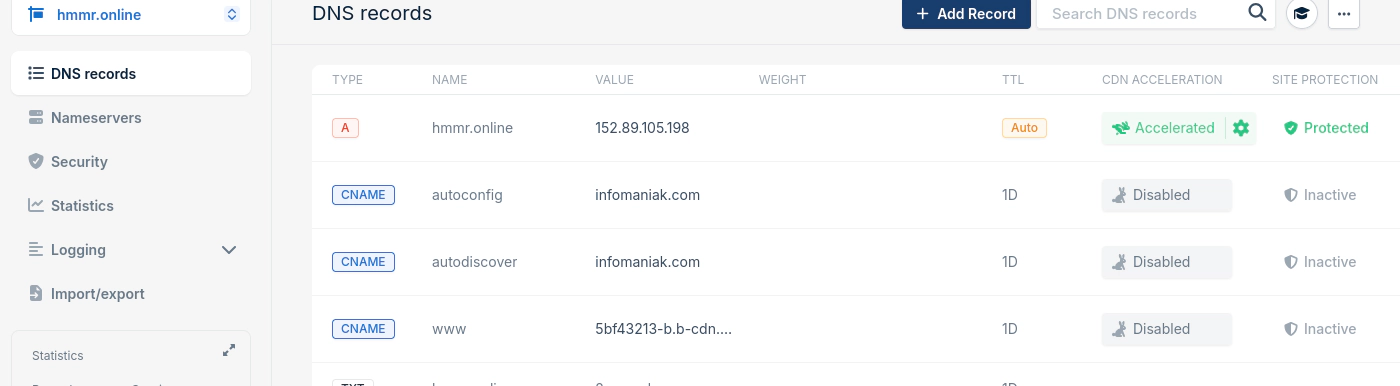
Bunny wires up the DNS record and the pull zone without me having to create anything by hand. Which solves the problem I mentioned at the start, where I can’t CNAME an apex domain. None of this hides my server though. Anyone who digs up the IP can spoof the host header and reach my origin directly. But that takes actual effort, and the prize is my blog without a CDN in front of it.
What I didn’t understand at first was why I couldn’t accelerate my AAAA record. A Bunny pull zone only pulls the origin over IPv4. The page itself still gets served over IPv6 from the CDN, but the AAAA record pointing at my server had to go.
Configuring the Pull Zone
Now it actually worked. The page stayed online. No error page this time.
The pull zone has a shit ton of options, and I’ll admit there are some I still don’t understand. But others are pretty straight forward.
First thing I did was add www.hmmr.online to the list of hostnames. That used to just redirect to the apex domain, but with the CDN in front, the redirect in my Traefik setup didn’t work anymore. One of the shit ton of options are edge rules. Those are pretty flexible and can do all kinds of things, one of them being redirects. Basically the same thing my Traefik container does on my server. So now any request with www. gets redirected to the apex domain. Brilliant.
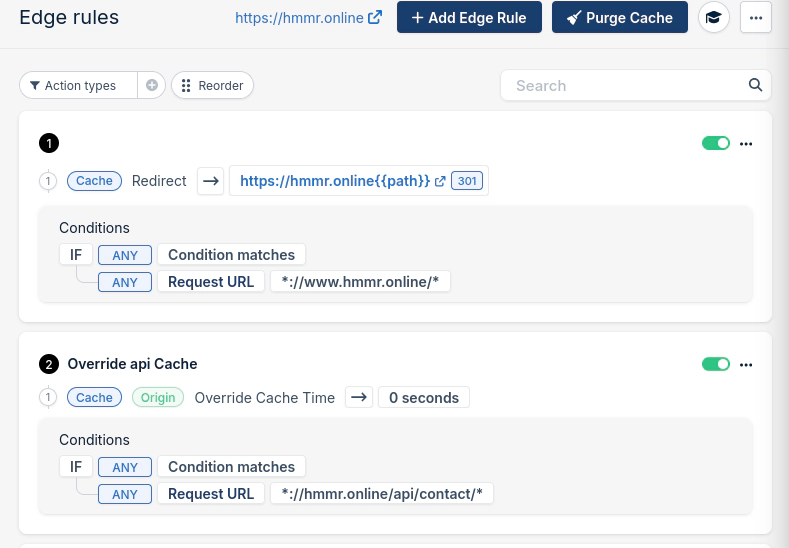
While I was in there: my blog has a contact form with an API endpoint for sending the message. Caching that wouldn’t make a lot of sense, would it. So I needed another rule. Cache time gets overridden to 0 for any request on the API endpoint, so it’s always served straight from my origin.
Some other options I changed because they seemed to make sense:
Enabled Verify Origin SSL Certificate. The pull zone verifies the certificate of the origin. No valid certificate, no pull. That way the connection between the two servers is guaranteed to be encrypted.
Disabled Smart Cache. Smart Cache is on by default and excludes all HTML from the cache, which is supposed to prevent sensitive data from accidentally getting cached. To cache your HTML you either create an edge rule for all safe paths, or, for a static site without sensitive data, you turn the whole thing off like I did.
Enabled Stale Cache. If the origin is unreachable, the page gets served from the cache instead. If the server reboots for updates, or I experiment on the live server again, the blog stays reachable through the CDN. Nice.
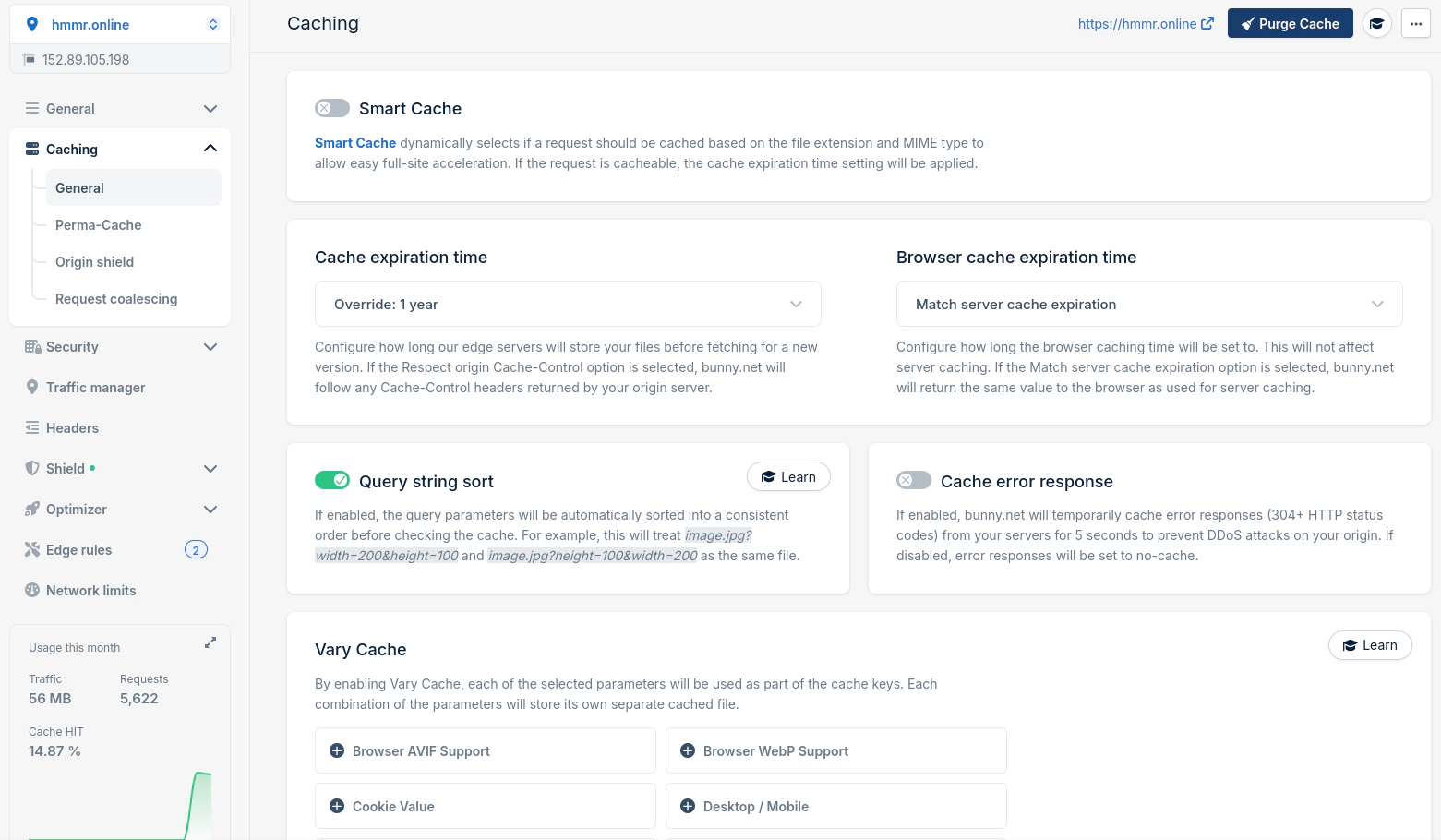
Oh. And to keep Bunny from emptying my bank account I set the monthly bandwidth limit for the pull zone to 50GB. Should be more than enough.
Almost Forgot the Certificates
There are two certificates now. Bunny gets one from Let’s Encrypt for the edge, which is what your browser sees. And my origin still needs its own, because I told the pull zone to verify it. Nobody talks to my server without a valid certificate, not even Bunny.
The edge one takes a single toggle in the pull zone. Bunny handles the renewal, I never think about it again.
Mine was the problem. My certs come from a DNS-01 challenge. Traefik writes a TXT record, Let’s Encrypt checks it, everyone’s happy. Through the netcup API, because that’s where my DNS lived.
Except it doesn’t anymore.
And the good part is it wouldn’t even break right away. The current certificate keeps working for weeks. Then one morning your blog greets everyone with a browser warning and you have no idea why.
Turns out Traefik speaks Bunny too. New resolver, API key, one line:
- "--certificatesresolvers.bunny.acme.dnschallenge.provider=bunny"This server also hosts another domain that still lives at netcup, so I couldn’t just repoint the existing resolver. But you can have as many as you want sitting next to each other. New one for this blog, old one untouched for the rest.
Telling the CDN About New Posts
With Smart Cache off, my HTML now sits at the edge for as long as the cache says it should. Which is great for visitors and terrible for me, because a new post would show up somewhere between “immediately” and “next week”, depending on which edge server you hit.
My deploy already runs on a Forgejo Actions runner: build the Astro site, rsync it to the server, done. So it just got one more step at the end. A single curl call against the Bunny API that purges the whole pull zone:
- name: Purge CDN cache
  run: |
    curl -X POST "https://api.bunny.net/pullzone/${{ secrets.BUNNY_PULLZONE_ID }}/purgeCache" \
      -H "AccessKey: ${{ secrets.BUNNY_API_KEY }}"
You get the API key from your Bunny account settings and the pull zone ID from the URL of the pull zone page. Both go into the repo secrets, obviously.
This nukes the entire cache, not just the files that changed. Bunny can be more surgical about it. Single URLs go through their API, or you tag your responses with a CDN-Tag header at the origin and then purge everything carrying that tag. That way a new post wipes its own page and leaves every other edge on the planet alone. Something to try once I have more than three readers.
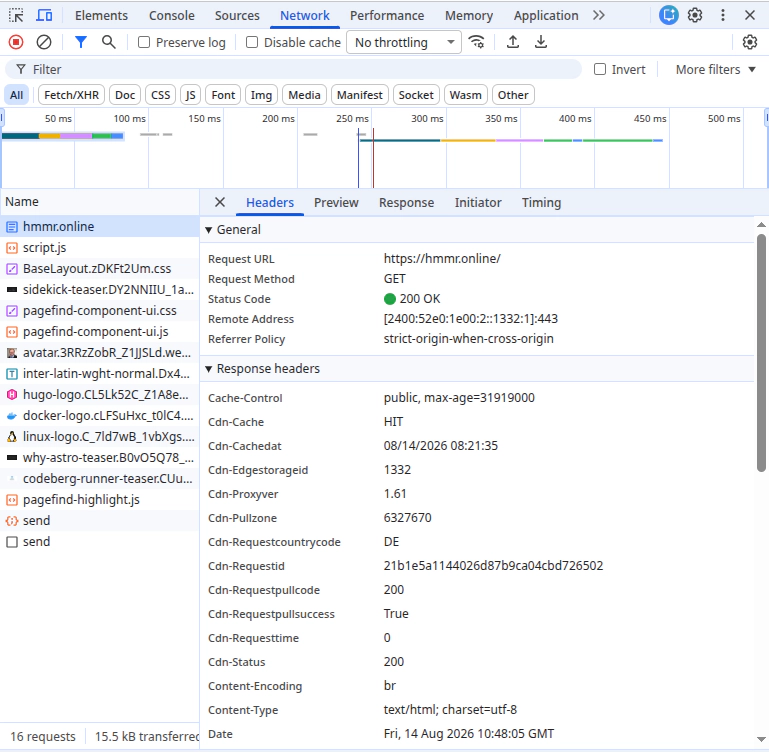
At this point I started wondering whether the CDN was doing anything at all. Loading times didn’t change for me here in Germany.
The answer is in the network tab of your browser’s dev tools. If the page comes from the CDN, the response headers tell you that, and which edge server it came from:
About That Cache Hit Ratio
The dev tools only tell you that one single request came from the edge. Whether the thing actually works day to day is in Bunny’s statistics tab. Requests per region, bandwidth, which edge server handled what, and the cache hit ratio.
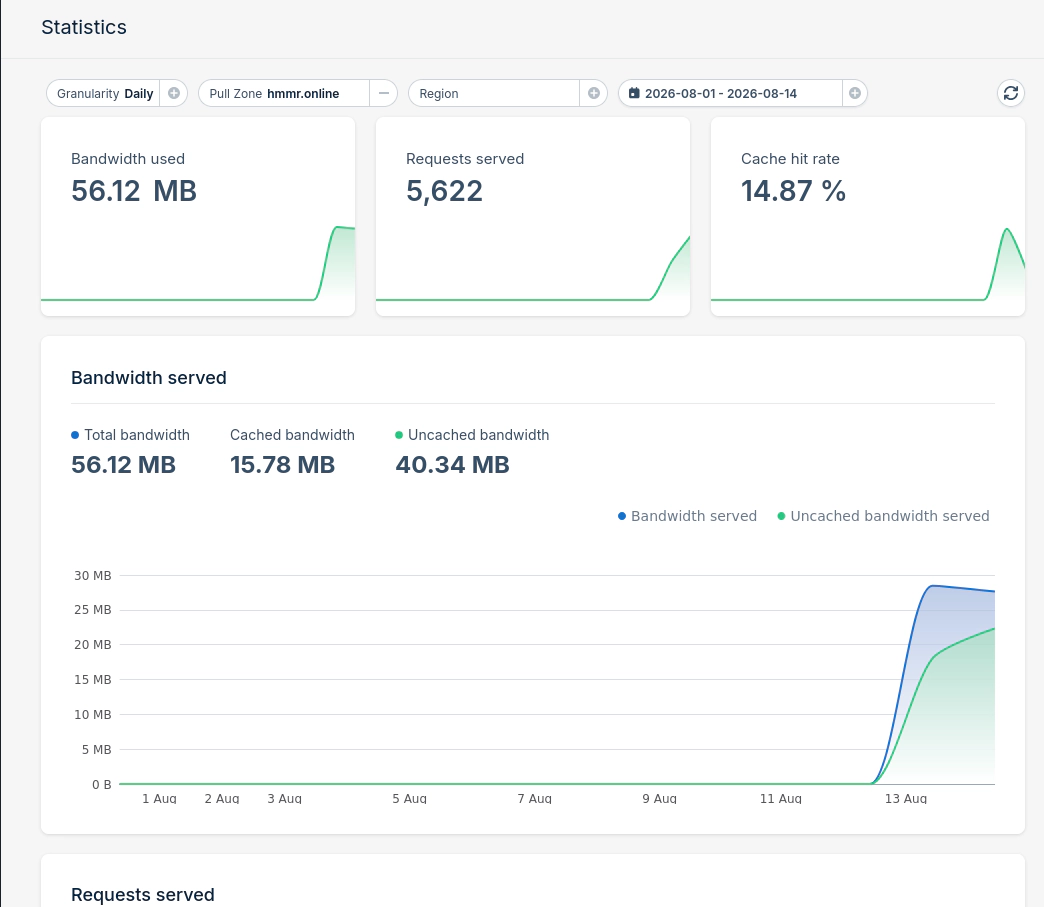
That last one is going to look bad for a while, and it’s not Bunny’s fault.
Bunny has more than a hundred points of presence. Every single one of them has to fetch the page from my server once before it can serve anything from cache. With three visitors a day spread across the planet, plenty of those edges never see a second visitor at all. Someone in Texas warms up the Dallas edge, and the next person shows up in Singapore.
What I could fix, I fixed. The cache expiration override in the pull zone is set to a year now. The edge holds on to my HTML until I explicitly tell it not to, and telling it not to is exactly what the purge in my deploy does.
Which is where my own setup was working against me. My deploy used to rebuild the site once a day, whether I had written anything or not. Every one of those builds ran the purge and wiped every edge on the planet. So every morning, all of it started from zero again. Now the site only gets rebuilt when I actually change something, which for this blog means every couple of days at best.
Was It Worth It?
I’m not sure yet. For a blog my size it’s most likely overkill. Maybe I’m a few posts away from becoming a trending blog. Rather unlikely.
But it was fun to set up anyway (except the privacy statement lol) and I learned a lot about how the internet actually works. I’ll check back on the cache hit ratio in a few weeks and see if this thing is doing anything at all.

Written by
Alexander Hammer
Software developer. Arch Linux. Self-hosted everything.
Popular Posts
-
#1
Putting a Bunny.net CDN in Front of My Static Blog
1429 views · Read -
#2
Why I Switched from Hugo to Astro
692 views · Read -
#3
Why I Switched from WordPress to Hugo
598 views · Read -
#4
Where to Actually Find Good Wallpapers
216 views · Read -
#5
Ricing Hyprland with Claude Code CLI
162 views · Read